// Website UI kit — Videos, Podcast, Email capture, FAQ, Footer.
const { Button, Eyebrow, EmailCapture, StageChip } = window.TechSales110_c20112;

function Videos() {
  const { SectionHead } = window;
  const vids = [
    { id: 'K2DhNRISaYM', title: 'How to Use ChatGPT as a Sales Engineer', stage: 'CONVEY' },
    { id: 'gu4NUvznXD8', title: 'The Ultimate Guide to Closing Every Call', stage: 'KEEP' },
    { id: 'IdVyjjQL828', title: 'Email Automation & Customer Segmentation', stage: 'HUNT' },
  ];
  return (
    <section id="videos" style={{ padding: '72px 0', background: 'var(--surface-page-alt)' }}>
      <div style={{ maxWidth: 1080, margin: '0 auto', padding: '0 22px' }}>
        <SectionHead eyebrow="Watch" title="Latest From the Channel"
          sub="Real plays, shown live on screen — including the AI tools reshaping tech sales." />
        <div style={{ display: 'grid', gridTemplateColumns: 'repeat(3,1fr)', gap: 18, marginTop: 40 }} className="vid-grid">
          {vids.map((v) => (
            <div key={v.id} style={{ background: 'var(--surface-card)', borderRadius: 'var(--radius-lg)', overflow: 'hidden', border: '1px solid var(--border-subtle)', boxShadow: 'var(--shadow-sm)' }}>
              <div style={{ aspectRatio: '16/9', background: 'var(--ink)', position: 'relative', display: 'flex', alignItems: 'center', justifyContent: 'center' }}>
                <img src={`https://i.ytimg.com/vi/${v.id}/hqdefault.jpg`} alt="" style={{ width: '100%', height: '100%', objectFit: 'cover', opacity: 0.94 }} />
                <div style={{ position: 'absolute', width: 56, height: 56, borderRadius: '50%', background: 'var(--gold)', display: 'flex', alignItems: 'center', justifyContent: 'center', boxShadow: '0 6px 18px rgba(0,0,0,.4)' }}>
                  <span style={{ color: 'var(--ink)', fontSize: 18, marginLeft: 3 }}>▶</span>
                </div>
                <div style={{ position: 'absolute', left: 10, bottom: 10 }}><StageChip stage={v.stage} /></div>
              </div>
              <div style={{ padding: '14px 16px 18px', fontFamily: 'var(--font-display)', fontWeight: 800, fontSize: 18, textTransform: 'uppercase', letterSpacing: '.01em', color: 'var(--text-strong)', lineHeight: 1.1 }}>{v.title}</div>
            </div>
          ))}
        </div>
        <p style={{ textAlign: 'center', marginTop: 30 }}>
          <Button variant="gold" as="a" href="https://www.youtube.com/@TechSales110" target="_blank" rel="noopener noreferrer">See All Videos →</Button>
        </p>
      </div>
    </section>
  );
}

function Podcast() {
  const bars = [10,18,30,22,44,58,40,26,52,64,46,30,20,36,54,62,48,34,24,42,56,50,38,28,16,26,40,58,46,32,22,38,54,60,44,30,20,34,50,42,28,18,30,46,38,24,14,20];
  return (
    <React.Fragment>
      <hr className="riso-divider" />
      <section data-theme="dark" style={{ position: 'relative', overflow: 'hidden', padding: '72px 0', background: 'radial-gradient(820px 440px at 82% 34%, #4A0E1C 0, #140A0D 66%)' }}>
        <div className="ember-field" aria-hidden="true"></div>
        <div style={{ position: 'relative', zIndex: 1, maxWidth: 1080, margin: '0 auto', padding: '0 22px', display: 'grid', gridTemplateColumns: '1fr .9fr', gap: 44, alignItems: 'center' }} className="hero-grid">
          <div>
            <Eyebrow>Listen</Eyebrow>
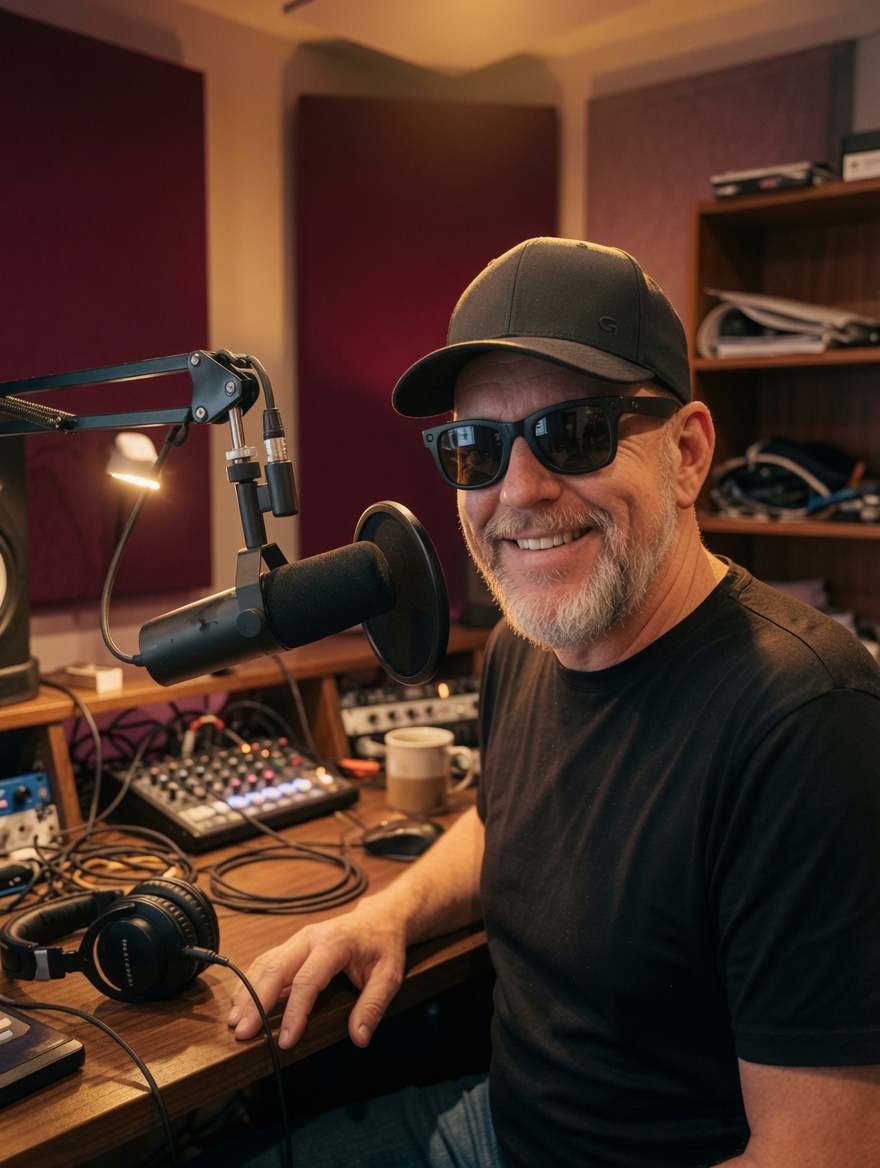
            <h2 style={{ fontFamily: 'var(--font-display)', fontWeight: 900, fontSize: 'var(--text-3xl)', lineHeight: 1.02, textTransform: 'uppercase', color: 'var(--cream)', margin: '10px 0 0' }}>The Tech Sales 110 Podcast</h2>
            <div className="draw-rule" style={{ marginTop: 16 }}></div>
            <p style={{ color: 'var(--text-on-dark-muted)', fontSize: 17, margin: '16px 0 22px', maxWidth: 460, lineHeight: 1.55 }}>
              The same hacks, in your ears. Real reps, AI in the field, and breaking-in stories — for the commute, the gym, the grind.
            </p>
            <div className="wave-bars" style={{ height: 44, marginBottom: 26 }}>
              {bars.slice(0, 32).map((h, i) => <i key={i} style={{ height: Math.round(h * 0.7) }}></i>)}
            </div>
            <Button variant="gold" as="a" href="https://Podcast.TechSales110.com" target="_blank" rel="noopener noreferrer">Listen Now →</Button>
          </div>
          <div className="hero-portrait" style={{ aspectRatio: '4 / 4.4' }}>
            <img src="assets/podcast-studio.jpg" alt="Tech Sales 110 podcast — in the studio" />
            <span className="hero-portrait-bug"><img src="assets/flame.svg" height="20" alt="" /> On Air</span>
          </div>
        </div>
      </section>
    </React.Fragment>
  );
}
window.Podcast = Podcast;

function EmailSection() {
  const [email, setEmail] = React.useState('');
  const [status, setStatus] = React.useState('idle'); // idle | loading | done | error
  const [msg, setMsg] = React.useState('');

  const submit = async (e) => {
    e.preventDefault();
    if (!email || status === 'loading') return;
    setStatus('loading');
    try {
      const clean = email.toLowerCase().trim();
      const res = await fetch(
        'https://firestore.googleapis.com/v1/projects/tech-sales-110/databases/(default)/documents/subscribers?key=AIzaSyDNbWT6rH7FrDpUFgqPgWrkabMREnZ6ohw',
        {
          method: 'POST',
          headers: { 'Content-Type': 'application/json' },
          body: JSON.stringify({
            fields: {
              email:     { stringValue: clean },
              source:    { stringValue: 'website' },
              createdAt: { timestampValue: new Date().toISOString() },
            }
          })
        }
      );
      if (!res.ok) throw new Error('Firestore write failed');
      setStatus('done');
      window.location.href = '/community';
    } catch {
      setStatus('error');
      setMsg('Something went wrong.  Try again.');
    }
  };

  return (
    <section id="email-section" style={{ padding: '72px 0', background: 'var(--surface-page)' }}>
      <div style={{ maxWidth: 680, margin: '0 auto', padding: '0 22px', textAlign: 'center' }}>
        <div style={{ display: 'inline-block', fontFamily: 'var(--font-body)', fontSize: 11, fontWeight: 700, letterSpacing: '.14em', textTransform: 'uppercase', color: 'var(--gold)', border: '1px solid rgba(255,194,51,.35)', borderRadius: 999, padding: '5px 14px', marginBottom: 18 }}>
          Free Access
        </div>
        <h2 style={{ fontFamily: 'var(--font-display)', fontWeight: 900, fontSize: 'var(--text-3xl)', textTransform: 'uppercase', letterSpacing: '.02em', color: 'var(--text-strong)', lineHeight: 1.05, margin: '0 0 14px' }}>
          Get the Free Book +<br />Members Playlist
        </h2>
        <p style={{ fontSize: 17, color: 'var(--text-muted)', lineHeight: 1.55, maxWidth: 480, margin: '0 auto 32px' }}>
          Drop your email and get instant access to the 52 Hacks ebook and the exclusive community video library.  No spam.  Unsubscribe anytime.
        </p>
        {status === 'done' ? (
          <p style={{ color: 'var(--gold)', fontFamily: 'var(--font-display)', fontWeight: 800, fontSize: 20, textTransform: 'uppercase' }}>
            ✓ You're in — redirecting…
          </p>
        ) : (
          <form onSubmit={submit} style={{ display: 'flex', gap: 10, maxWidth: 460, margin: '0 auto', flexWrap: 'wrap' }}>
            <input
              type="email" required placeholder="your@email.com"
              value={email} onChange={(e) => setEmail(e.target.value)}
              style={{ flex: 1, minWidth: 200, padding: '13px 16px', borderRadius: 'var(--radius-md)', border: '1px solid var(--border-subtle)', background: 'var(--surface-card)', color: 'var(--text-strong)', fontFamily: 'var(--font-body)', fontSize: 15, outline: 'none' }}
            />
            <button
              type="submit" disabled={status === 'loading'}
              style={{ background: 'var(--gold)', color: 'var(--ink)', border: 'none', borderRadius: 'var(--radius-md)', padding: '13px 24px', fontFamily: 'var(--font-display)', fontWeight: 900, fontSize: 14, textTransform: 'uppercase', letterSpacing: '.05em', cursor: status === 'loading' ? 'wait' : 'pointer', opacity: status === 'loading' ? .7 : 1 }}
            >
              {status === 'loading' ? '…' : 'Get Access →'}
            </button>
            {status === 'error' && (
              <p style={{ width: '100%', color: 'var(--maroon)', fontSize: 13, margin: '4px 0 0', textAlign: 'center' }}>{msg}</p>
            )}
          </form>
        )}
      </div>
    </section>
  );
}

function Faq() {
  const { SectionHead } = window;
  const [open, setOpen] = React.useState(0);
  const items = [
    { q: 'How do I get into tech sales with no experience?', a: 'You build proof and fluency. Work the 52-hack curriculum in order: prospect, run discovery, demo, and close — then map each skill to the methodology your target employer uses. You\'ll interview sounding like you\'ve already done the job.' },
    { q: 'What is a sales engineer (SE), and is this for me?', a: 'A sales engineer is the technical half of a sales team — running demos and proving the solution fits. This curriculum covers the SE craft alongside closing skills, so it fits SEs, account execs, and anyone selling technology.' },
    { q: 'Which methodology should I learn — Sandler, SPIN, or MEDDIC?', a: 'All of them, lightly — because different employers run different ones. Tech Sales 110 maps every hack into Sandler, SPIN, Solution Selling, MEDDIC, MCEM, Demo2Win, and Track Selling.' },
    { q: 'Is the content free?', a: 'Yes — all 52 curriculum videos are free on YouTube. The $5/month membership adds the AI prompt kits, handouts, a free PDF of the book, the crosswalk, and live monthly Q&A.' },
    { q: 'Who teaches it?', a: 'Pierre Hulsebus — 40+ years in technology sales and a former Microsoft Global Black Belt for Dynamics 365. Practical hacks from someone who actually carried the bag.' },
  ];
  return (
    <section style={{ padding: '72px 0', background: 'var(--surface-page-alt)' }}>
      <div style={{ maxWidth: 1080, margin: '0 auto', padding: '0 22px' }}>
        <SectionHead eyebrow="Questions" title="Breaking In, Answered" />
        <div style={{ maxWidth: 800, margin: '36px auto 0' }}>
          {items.map((it, i) => (
            <div key={i} style={{ borderBottom: '1px solid var(--border-subtle)', padding: '18px 0' }}>
              <button onClick={() => setOpen(open === i ? -1 : i)} style={{ all: 'unset', cursor: 'pointer', width: '100%', display: 'flex', justifyContent: 'space-between', alignItems: 'center', gap: 16, fontFamily: 'var(--font-display)', fontWeight: 800, fontSize: 20, textTransform: 'uppercase', letterSpacing: '.005em', color: 'var(--text-strong)' }}>
                {it.q}
                <span style={{ color: 'var(--color-brand)', fontSize: 26, lineHeight: 1, fontFamily: 'var(--font-body)' }}>{open === i ? '–' : '+'}</span>
              </button>
              {open === i && <p style={{ color: 'var(--text-muted)', marginTop: 10, fontSize: 15.5, lineHeight: 1.6, maxWidth: 680 }}>{it.a}</p>}
            </div>
          ))}
        </div>
      </div>
    </section>
  );
}

function Footer() {
  return (
    <footer data-theme="dark" style={{ background: 'var(--ink)', color: 'var(--text-on-dark-muted)', padding: '44px 0', textAlign: 'center', fontSize: 14, fontFamily: 'var(--font-body)', borderTop: '1px solid var(--maroon)' }}>
      <div style={{ maxWidth: 1080, margin: '0 auto', padding: '0 22px' }}>
        <a href="#top" style={{ display: 'inline-flex', alignItems: 'center', gap: 10, color: 'var(--cream)', fontFamily: 'var(--font-display)', fontWeight: 900, fontSize: 22, textTransform: 'uppercase', letterSpacing: '.01em', marginBottom: 12, textDecoration: 'none' }}>
          <img src="assets/flame.svg" height="26" alt="" />
          Tech Sales <span style={{ color: 'var(--gold)' }}>110</span>
        </a>
        <p>Tech Meets Sales Success · <a href="https://www.youtube.com/@TechSales110" target="_blank" rel="noopener noreferrer" style={{ color: 'var(--gold)', textDecoration: 'none' }}>@TechSales110</a> · techsales110.com · The Tech Sales 110 Podcast</p>
        <p style={{ marginTop: 8, fontSize: 12, opacity: .7 }}>© Tech Sales 110. Break into technology sales.</p>
      </div>
    </footer>
  );
}
window.Videos = Videos;
window.EmailSection = EmailSection;
window.Faq = Faq;
window.Footer = Footer;